Uniglobe - Product Page
Anabel Fernandez · Updated February 19, 2026
The product is just about the travel offer page, the suppliers offers and sales. The following image show you the structure of a example product page.
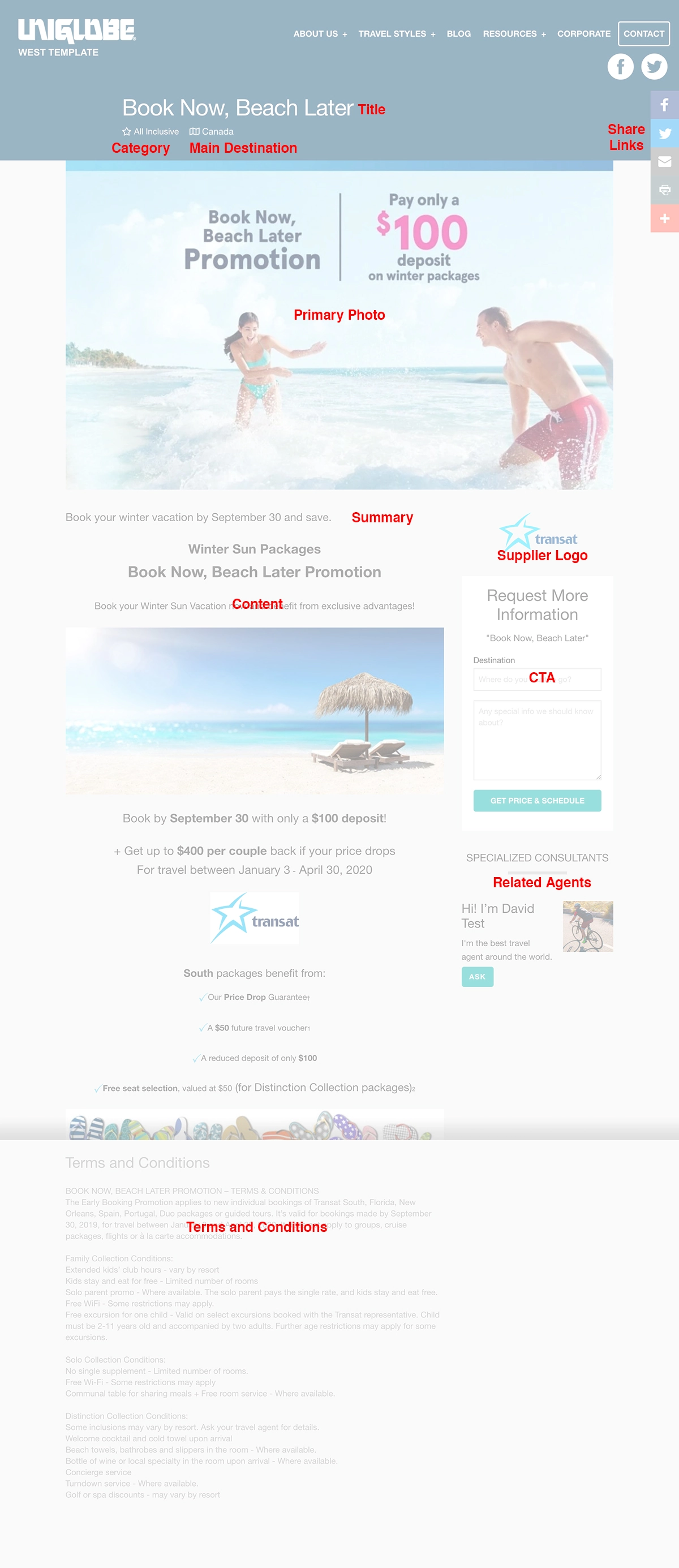
Product Title
Give your product an engaging, short and descriptive at the same time.
Content
Is about a description for that specific offer. Write all the necessary details.
When creating the content, please do not copy and paste from another source because you also will be coping all the styles and layout from that source. Use the editor correctly:
- When having a subtitle use an h3, never use a h1 because that element is assigned to the product title.
- Do not use tables for creating layout or position the elements inside the page, only when is a real table content.
- Do not assign specific sizes or styles, like different colors, backgrounds. Keep it simple, clean and easy to read. The template styles are there for that reason.
- Use the bullets if you want to list some content or features.
Summary
Is to summarize about the product and will be used as a meta description of your “Travel Offer”. By default, when the teaser is not there the system will automatically take part of the content as a meta description.
Primary Image
Select a good destinations pictures, 1500px x 900px is the recommended size but you can use another size, you only must keep the width minimum 1024px and 1MB maximum weight.
The template has the option to add selected offers, products with tag: banner, to the home-page slider banner, for that reason we recommend avoiding images with text, logos or any specific graphic inside.
Destination
If the offer belongs to a specific destination we encourage you adding there, is excellent for SEO.
Category
The system has a default list of travel categories, please assign when is possible.
Terms and Conditions
Write here all the important terms related to the offer. Always will show at the end of the content.
Supplier Logo
The supplier is one of the related content inside the product page. Here will show the logo and link to the Supplier Page, with the same source as the product.ex: celebrity, norwegian, transat... Each source is unique.
Remember always check the spreadsheet the list of sources, copy and paste from the sheet and be sure don't leave any space before or after.
Consultants
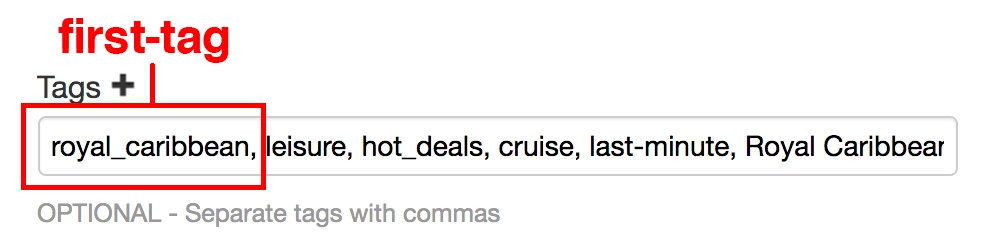
It is a section with the list of up to 3 related agents. Agents with the same first product tag:
royal_caribbean, leisure, hot_deals, cruise, last-minute, Royal Caribbean International, RCI, cruise sale, Adventure on Deck, calgary, banner, featured.
The list above is an example of a product tags. If the agent has the tag "royal_caribbean" will show in the right side of the product page. Which means, that always use as a first-tag of the product the one you want to show the specialized agent/s, doesn't matter if is about the supplier, a destination or a kind of travel.
Even though you can add as many tags as you want, remember always keep all the ones used for related content inside the spreadsheet.
Others
Also inside the template of the product page are:
- The Itinerary, a good feature when the product is about a whole tour and you want to show the day by day activities and details.
- The Price of the offer, you can show the minimum price of the offer.
- Additional Images.