
What about if you want to delete one of the links at your top menu website?
Yes, is completely possible to do it yourself and we will need the exactly "/color.css" page we use for "Updating design styles". If you already created that page you don't need to create another, you can continuing adding CSS codes in the same page, as many as you want.
Imagine you want to remove "Blog" link. Here are the steps you should follow:

Step 1 - Adding the .css code
Note: Remember, if you didn't create yet the "/colors.css" page check the "Updating design styles" help.
For "Blog" link, you need to add the code bellow:
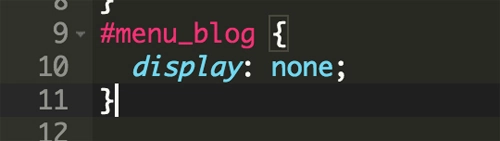
Same structure you will use if you want to remove any other menu item, just need to use the individual IDs:
- Home: #menu_home
- Experiences: #menu_experience
- Destinations: #menu_destination
- Blog: #menu_blog
- Search Trips: #menu_search (if search link)
- Weddings: #menu_weddig (if wedding-link)
- Contact Us: #menu_contact
Step 2 - Save and test
Save your changes in the "/colors.css" page and test your changes. The result will look like the image bellow:

Want to add new link? Check the steps here