How to export CSV file from google sheets
To export a CSV from Google Sheets, follow these steps:
- Open the Google spreadsheet that contains the data that you want to export
- Click on the tab that has the data to be exported (CSV files only contain one spreadsheet tab)
- On the top toolbar, click "File". A drop-down menu will appear
- Click "Download", and another menu will appear
- Click "Comma-separated values (.csv, current sheet)"
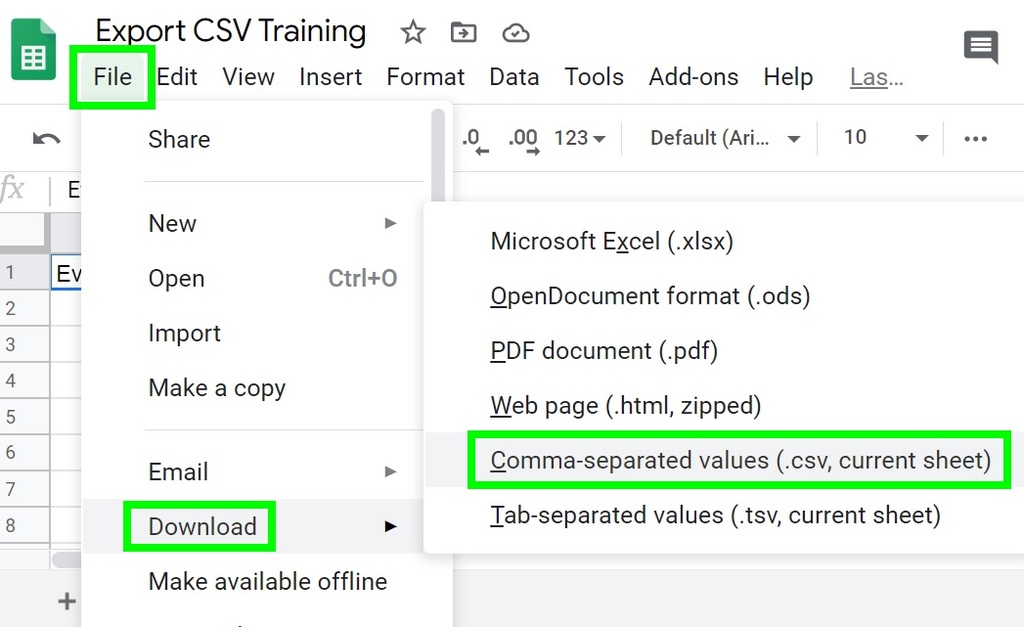
After following the steps above, the data from the selected tab of your Google spreadsheet will be exported into a CSV file that will download directly to your computer's "Downloads" folder.
Click here to see how to export CSV file from your excel
Click here to see how to export CSV file from your Gmail
Click here to see how to export CSV file from your outlook desktop
Click here to see how to export CSV file from your outlook web